
What's New

Follow new updates and improvements to GameGlass.

Component sorting & filtering
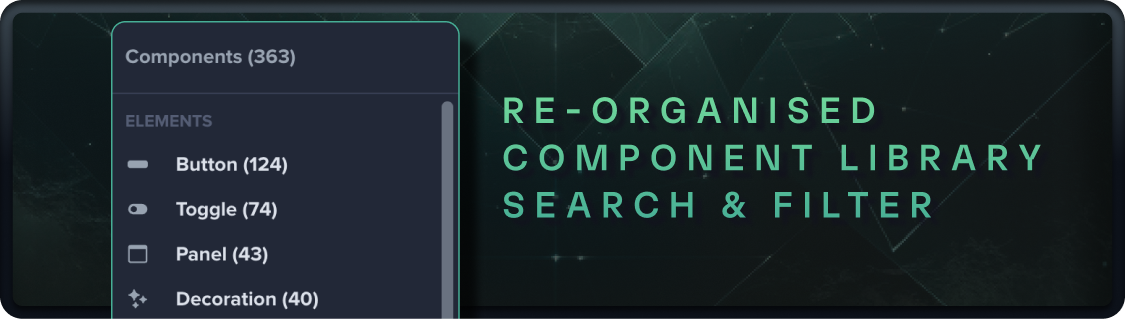
As we’ve increased the number and variety of components in the Forge, it has become harder to find the perfect button or toggle for your Shard.

As the first step in revamping the Component Library we’ve added new sorting and filtering features, and re-organised how components are grouped.

You can now view all components by type, regardless of the game or style - making it easy to see all the toggles for example.

We’ve added style and genre tags to every component, giving you new ways to find components that suit the game you’re playing.

And finally, you can now see all the components designed specifically for a game in one place.

Oh and we’re hard at work on a refresh of many older components, with enhanced visuals and animations. Coming soon!
Improved

App Resume and Background Connection

Our latest Android, IOS, and Amazon Apps now stay connected in the background whenever possible, rather than reloading every time you switch to another app or from a locked state. Additionally, the app will always resume between sessions from the last used shard.

The background connection time varies by OS, device settings, and activity, but you can expect the connection to resume immediately anywhere between 30 seconds and up to 10 minutes, or automatically reload to restore the connection when needed.

As an added bonus: Shard switching load times have been greatly reduced for our premium Star Citizen and Elite Dangerous shards to make the various control panels even more accessible at a moment’s notice.

Smooth right?

Enjoy :)

Improved

Star Citizen 3.23 Automatic Keybind Injection

With version 6.0.7 and above of GameGlass Hub, we now inject the keybind mapping file automatically on start to all Star Citizen install environments. No more manually copy pasting the keybinds! Simply select "GameGlass Keyboard 3.23" in-game and you're all set.

For complete instructions see our support article: https://support.gameglass.gg/en/articles/8188939-star-citizen-keybind-setup

------

Also, we have now removed the Elite Dangerous Legacy shards. If you had purchased any of them previously you can now use the upgraded v2 versions of these shards which are available on your account in library or from the explore tab.

Improved

Earlier updates